
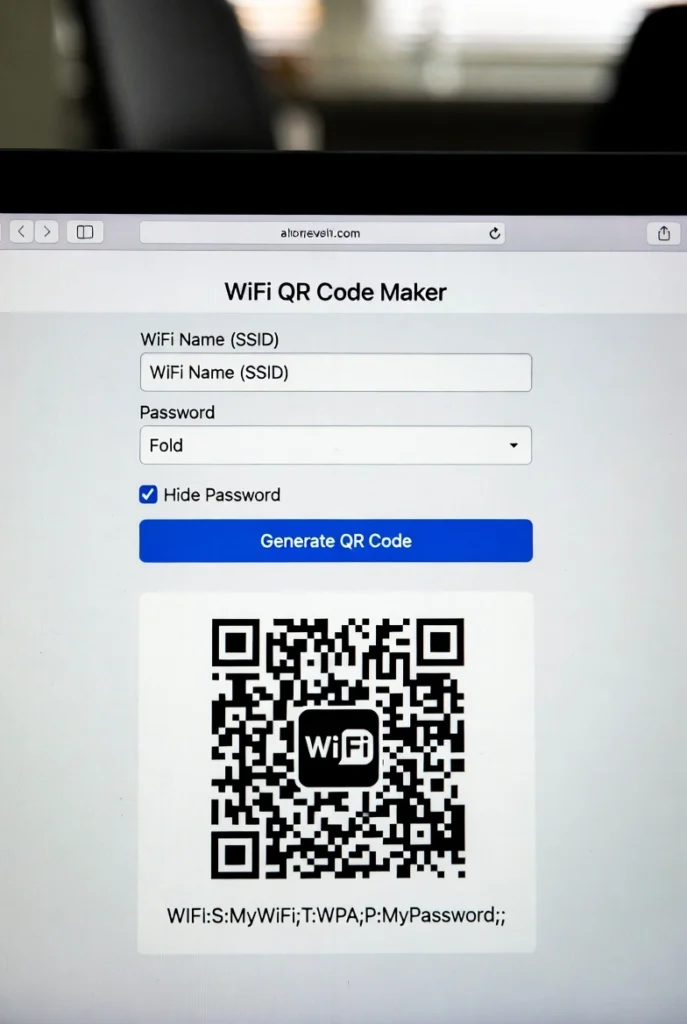
WiFi QR Code Maker
Generate a QR code to share your WiFi credentials easily.
WiFi QR Code Maker | Share WiFi Instantly & Securely
Create a WiFi QR code to share your network without passwords. Our free generator makes secure WiFi sharing easy for homes, offices, and businesses.
Introduction
Tired of reading out your long, complicated WiFi password to every guest? Want to provide internet access to customers without revealing your password? There’s a simpler, more secure solution. A WiFi QR code maker transforms your network credentials into a scannable code that connects devices instantly. This guide will show you how QR codes revolutionize WiFi sharing and how our free tool creates them in seconds.
What is a WiFi QR Code Maker?
A WiFi QR code maker is a tool that generates a custom QR code containing your wireless network information. When scanned, it automatically connects devices to your WiFi without manual password entry.
Our secure generator creates codes for:
- All security types (WEP, WPA, WPA2, WPA3)
- Hidden and visible networks
- Both 2.4GHz and 5GHz frequencies
- Business and home use cases
- Customizable designs with your branding
Why Use WiFi QR Codes?
QR code WiFi sharing offers significant advantages over traditional password methods.
1. Ultimate Convenience
Guests connect with a simple camera scan—no typing complex passwords or spelling out characters.
2. Enhanced Security
You never have to verbally share or display your password, reducing the risk of unauthorized access.
3. Professional Appearance
Businesses can display elegant QR codes instead of handwritten passwords, improving customer experience.
4. Time Saving
Eliminate the frustration of failed password attempts and connection troubleshooting with visitors.
Key Features of Our WiFi QR Code Maker
Our tool stands out with these user-focused features for perfect QR code generation.
- One-Click Generation: Create codes instantly with your network details
- Custom Design Options: Choose colors, add logos, and adjust frame styles
- Multiple Format Downloads: PNG, SVG, and PDF for any use case
- Security Verification: Confirm your credentials before generating codes
- No Registration Required: Generate codes immediately without signing up
Common Use Cases and Applications
WiFi QR codes solve connection problems in various settings and scenarios.
Home and Personal Use
- Create codes for guest networks
- Help elderly relatives connect easily
- Simplify connections for smart home devices
Business and Hospitality
- Restaurants and cafes for customer WiFi
- Hotel room network access
- Office visitor and conference room networks
Events and Public Spaces
- Wedding guest internet access
- Conference and meeting WiFi
- Temporary event networks
How to Create a WiFi QR Code in 3 Steps
Generating your custom connection code is quick and straightforward.
- Enter Network Details: Input your SSID, password, and security type
- Customize Design: Choose colors and style (optional)
- Download and Print: Save your QR code and display it wherever needed
WiFi QR Code Security Best Practices
Protect your network while enjoying convenient sharing benefits.
Use Guest Network
Create a separate guest network with limited access for QR code sharing.
Regular Password Updates
Change your WiFi password periodically and generate new QR codes.
Secure Physical Placement
Place codes where only authorized users can access them, not publicly visible from outside.
Monitor Connected Devices
Regularly check which devices are connected to your network through router administration.
Conclusion
WiFi QR codes transform the frustrating process of network sharing into a seamless, secure experience. A reliable WiFi QR code maker eliminates password confusion, enhances security, and provides professional connectivity solutions for homes and businesses alike. Whether you’re hosting guests, serving customers, or managing office visitors, QR code access makes WiFi sharing effortless and secure.
Ready to simplify your WiFi sharing? [Use our free WiFi QR Code Maker now] and create your custom connection code in seconds!
Checkout Our new UUID Generator here….
Frequently Asked Questions (FAQs)
Is this WiFi QR code maker completely free?
Yes, 100% free with no usage limits, watermarks, or hidden costs.
Is my WiFi password safe when generating the QR code?
Absolutely. All processing happens in your browser—we never store or transmit your password.
What devices can scan WiFi QR codes?
Most modern smartphones with built-in cameras can scan them, including iPhones and Android devices.
Can I create codes for hidden networks?
Yes, our tool supports both visible and hidden WiFi networks.
Is this WiFi QR code maker completely free?
Yes, 100% free with no usage limits, watermarks, or hidden costs.
Is my WiFi password safe when generating the QR code?
Absolutely. All processing happens in your browser—we never store or transmit your password.
What devices can scan WiFi QR codes?
Most modern smartphones with built-in cameras can scan them, including iPhones and Android devices.
Can I create codes for hidden networks?
Yes, our tool supports both visible and hidden WiFi networks.
